How to Apply for IPO Through ProStocks?
Please note: The maximum application value permissible through UPI method is Rs 500,000. Apply IPO through the ASBA option in your net banking login if the value exceeds Rs 500,000.
Mobile Application:
- Login: Open the app and log in with your credentials.
- Access IPO Section: Tap More (bottom-right) > Bids.
- Select IPO: Choose the desired IPO from the list.
- Enter Details:
- UPI ID (linked to your bank).
- Quantity & Price (use Cut-Off Price if preferred).
- Submit & Approve:
- Tap Submit.
- Approve the mandate in your UPI app to block funds.

Web Trading Login:
- Visit star.prostocks.com and log in with your credentials.
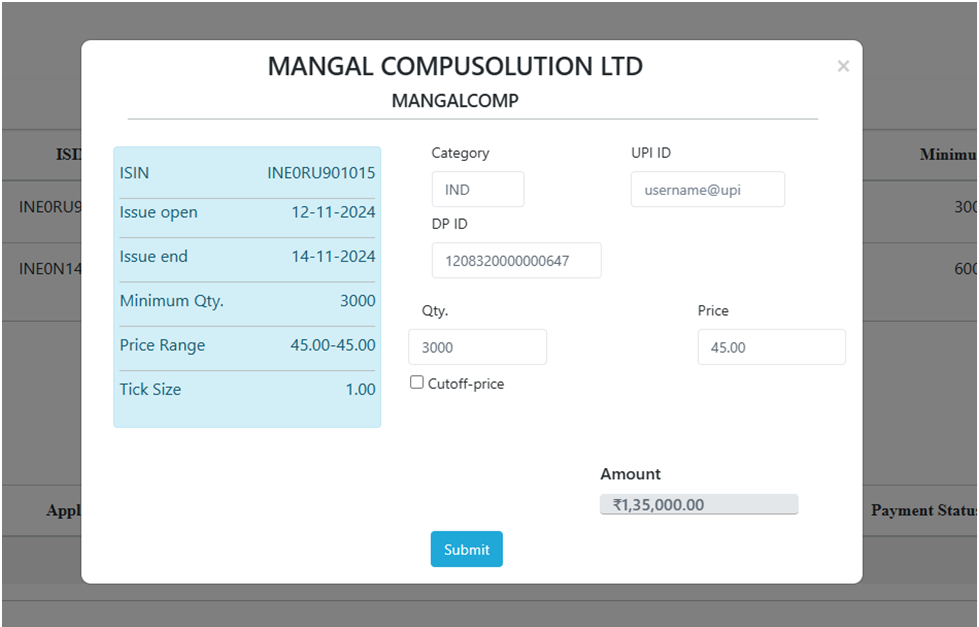
- Use the Apply IPO button on the dashboard to reach the IPO bids screen.
- Choose the desired ongoing IPO.
- Enter Details:
- UPI ID (linked to your bank).
- Quantity & Price (use Cut-Off Price if preferred).
- Submit & Approve:
- Tap Submit.
- Approve the mandate in your UPI app to block funds.